
Home / Solutions / Maintenance Calendar
Maintenance Calendar
See the clash before both links go dark.
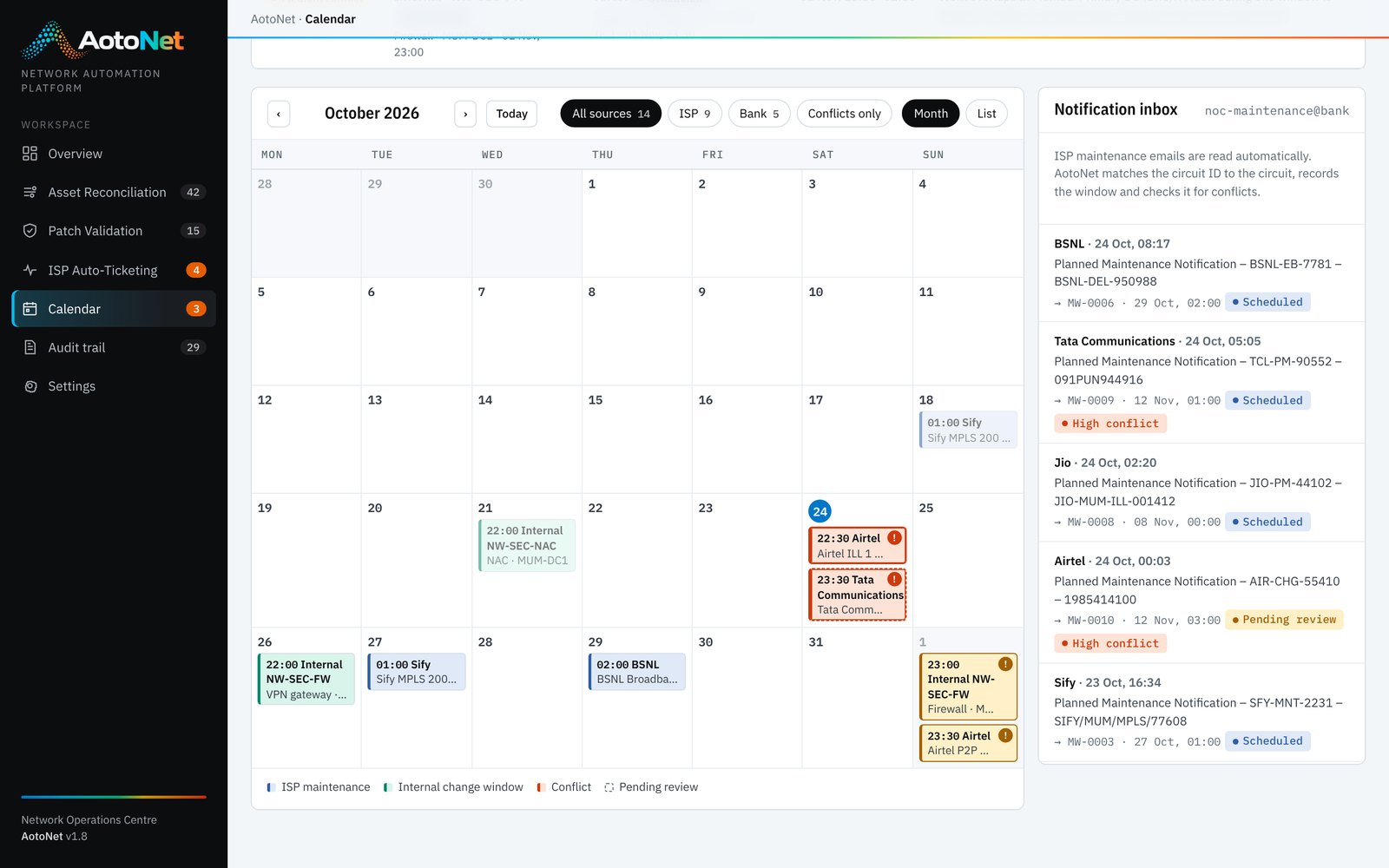
Carrier maintenance notices arrive by email; internal change windows live in the ITSM tool. AotoNet puts both on one calendar and flags overlapping work before it turns a planned activity into an outage.
The challenge
Why the traditional approach breaks down
Planned downtime is spread across inboxes, spreadsheets and change tickets.
Maintenance emails sit unread or are filed without being acted on.
Two carriers serving the same site schedule work on the same night.
A firewall upgrade lands on the night the carrier works on the same site.
Faults during accepted maintenance still trigger tickets and escalations.
Two ways to do the job
From manual effort to an automated pipeline
How it is done today
Planned downtime is spread across inboxes, spreadsheets and change tickets.
- Read the emailCarrier maintenance notices land in a shared mailbox, each in a different format.
- Copy it somewhereSomeone copies the window into a spreadsheet or shared calendar, if they remember.
- Check by memoryNobody cross-checks against other carriers or internal change windows.
- Find out the hard wayTwo redundant links go down on the same night, and a ticket is raised for planned work.
How AotoNet automates it
AotoNet reads the notices, places them and checks them for conflicts automatically.
- Read carrier emailsReference, circuit IDs, window and expected impact extracted from each notice.
- Match circuitsCircuit IDs mapped to your sites, devices and business services.
- Add internal windowsChange windows for firewalls, switches, routers and other devices on the same calendar.
- Detect conflictsHigh, medium and low conflicts, with the reason written out.
- RespondAccept, reject or request a reschedule, with a reply drafted proposing a free slot.
- Suppress false ticketsAccepted carrier windows stop faults on those circuits from raising tickets.
Side by side
What changes, point by point
| Aspect | Traditional approach | With AotoNet |
|---|---|---|
| Intake | Shared mailbox, read when someone has time | Emails read and parsed automatically |
| Visibility | Spreadsheets and personal calendars | One calendar for carrier and internal windows |
| Conflict checks | None, or by memory | Automatic by site, service and time, with severity |
| Response to carrier | Ad hoc emails | Accept, reject or reschedule with a drafted reply |
| Ticketing during maintenance | False tickets raised | Suppressed automatically for accepted windows |
Capabilities
What Maintenance Calendar includes
Email parsing
Carrier notices turned into structured windows with circuits, timing and impact.
Unified calendar
Month and list views for carrier and internal windows, filterable by source.
Conflict engine
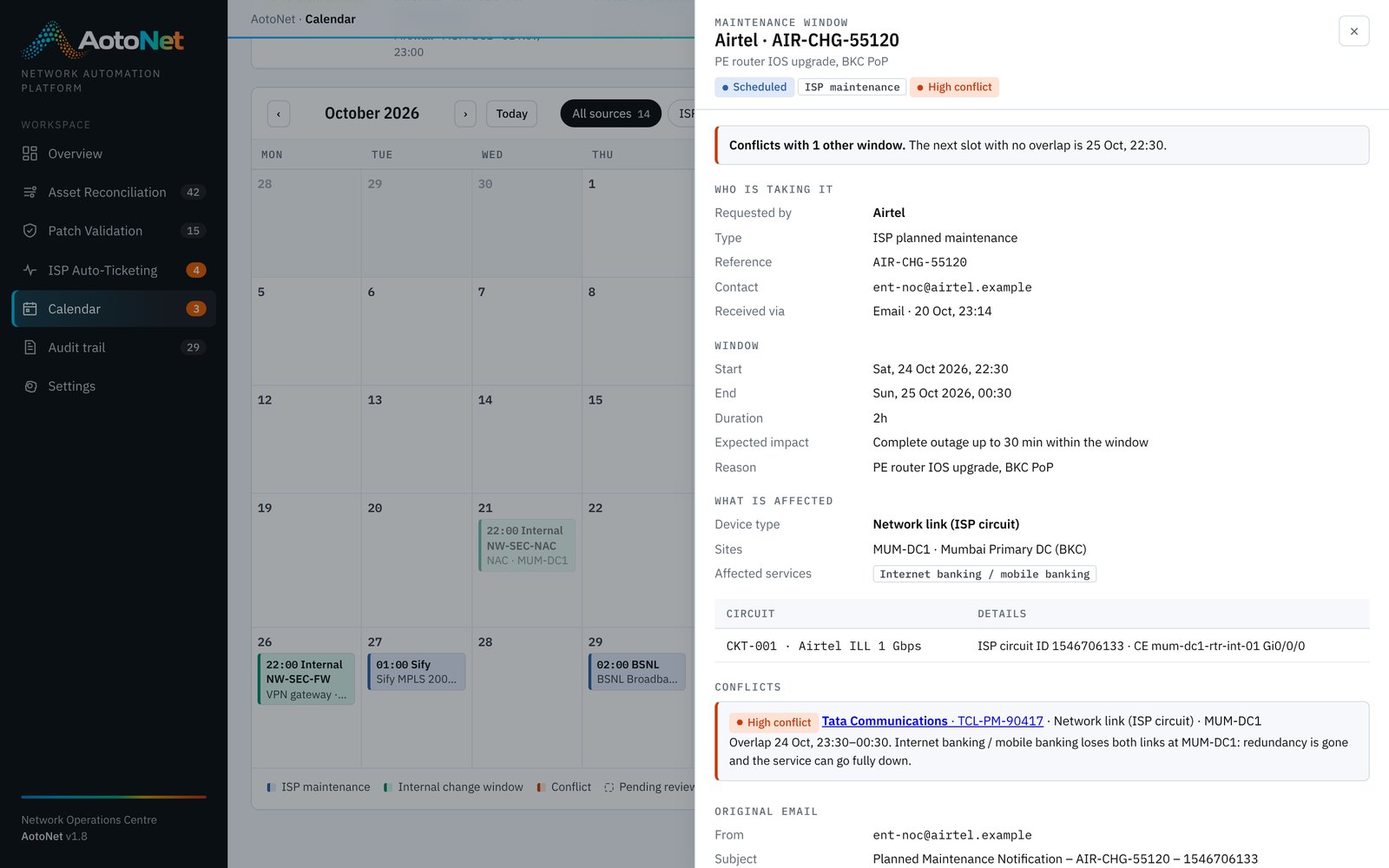
Same service losing both paths, same site at the same time, or concurrent carrier work.
Window details
Who is taking the window, device type, devices or circuits, sites and affected services.
Suggested free slots
The next slot with no overlap, offered when you request a reschedule or move a window.
Linked to ticketing
Accepted windows feed ISP Ticket Management so planned work never raises a fault ticket.
Benefits of automation
What your team gains
Clashes are caught when the notice arrives, while there is time to move one.
Both paths of a critical service are never down together by plan.
No fault tickets for work everyone already agreed to.
Network, change and service teams look at the same calendar.
Connects to
Same platform, same data
Works hand in hand with
See Maintenance Calendar on your own network.
Book a 30-minute walkthrough, then run a pilot on a sample of your own data.