
Network operations automation
Network operations that run themselves, and show their work.
AotoNet automates the repetitive work of running an enterprise network: keeping the inventory accurate, triaging vendor patches, raising and chasing carrier tickets, and planning maintenance. Every decision comes with the evidence behind it.
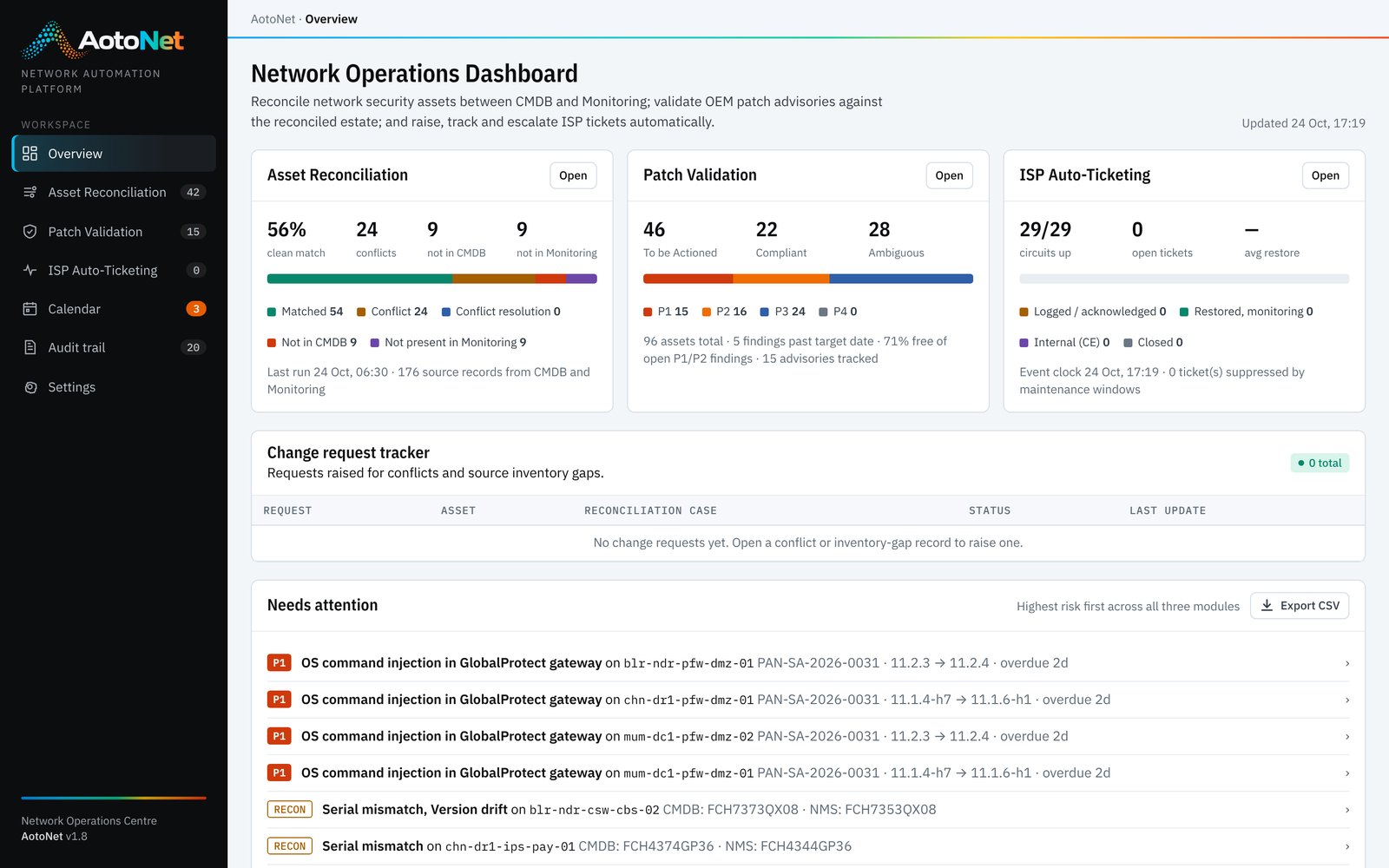
Connects to the tools your network team already runs
- ITSM & CMDB platforms
- Network monitoring & observability
- Firewall & device managers
- OEM security advisory feeds
- Carrier APIs, portals & NOC mailboxes
- SNMP, syslog & telemetry
- Email & collaboration
The challenge
Network operations still run on spreadsheets, inboxes and phone calls.
Networks have grown more complex while the way they are operated has barely changed. Engineers move data between tools by hand, chase vendors and carriers, and rebuild the same reports for every audit. The work is repetitive, error-prone and invisible until something breaks.
Versions drift, serials are mistyped, duplicate CIs pile up, and devices on the network were never registered.
Every vendor publishes on its own schedule. Working out which devices are affected is still done in spreadsheets.
A link goes down, someone notices, someone finds the circuit ID, someone calls the ISP, and someone remembers to escalate.
Two carriers pick the same night, or a carrier picks your firewall upgrade window, and a redundant service goes dark.
Why automate
What changes when the routine runs itself
Automation is not about removing engineers from the loop. It removes the copying, matching and chasing, so people spend their time on the decisions that need them.
Faults reach the carrier in minutes and advisories are triaged the morning they appear.
Rules apply the same logic every time, across every device, vendor and carrier.
Every device, advisory and circuit is checked, not a sample or the ones someone remembered.
Every run, decision and approval is recorded, so audits take hours rather than weeks.
Solutions
Four modules available today, on one platform and one set of data.
Asset Reconciliation
One trusted inventory from every source, with each conflict explained.
Explore →Network Patch Management
Daily vendor advisories matched to real versions, risk-scored and tracked to verified closure.
Explore →ISP Ticket Management
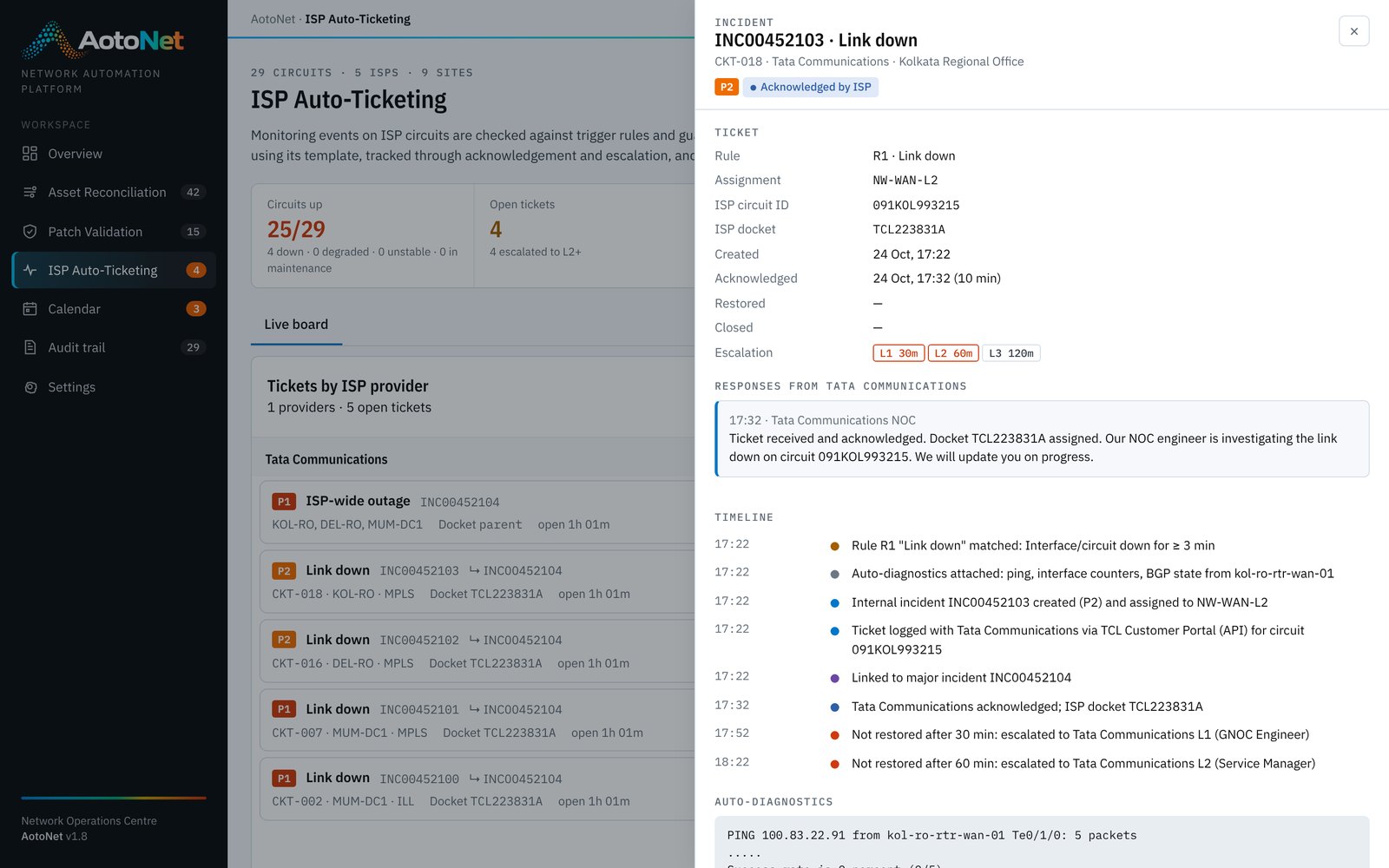
Carrier faults detected, logged, escalated and closed without a phone call.
Explore →Maintenance Calendar
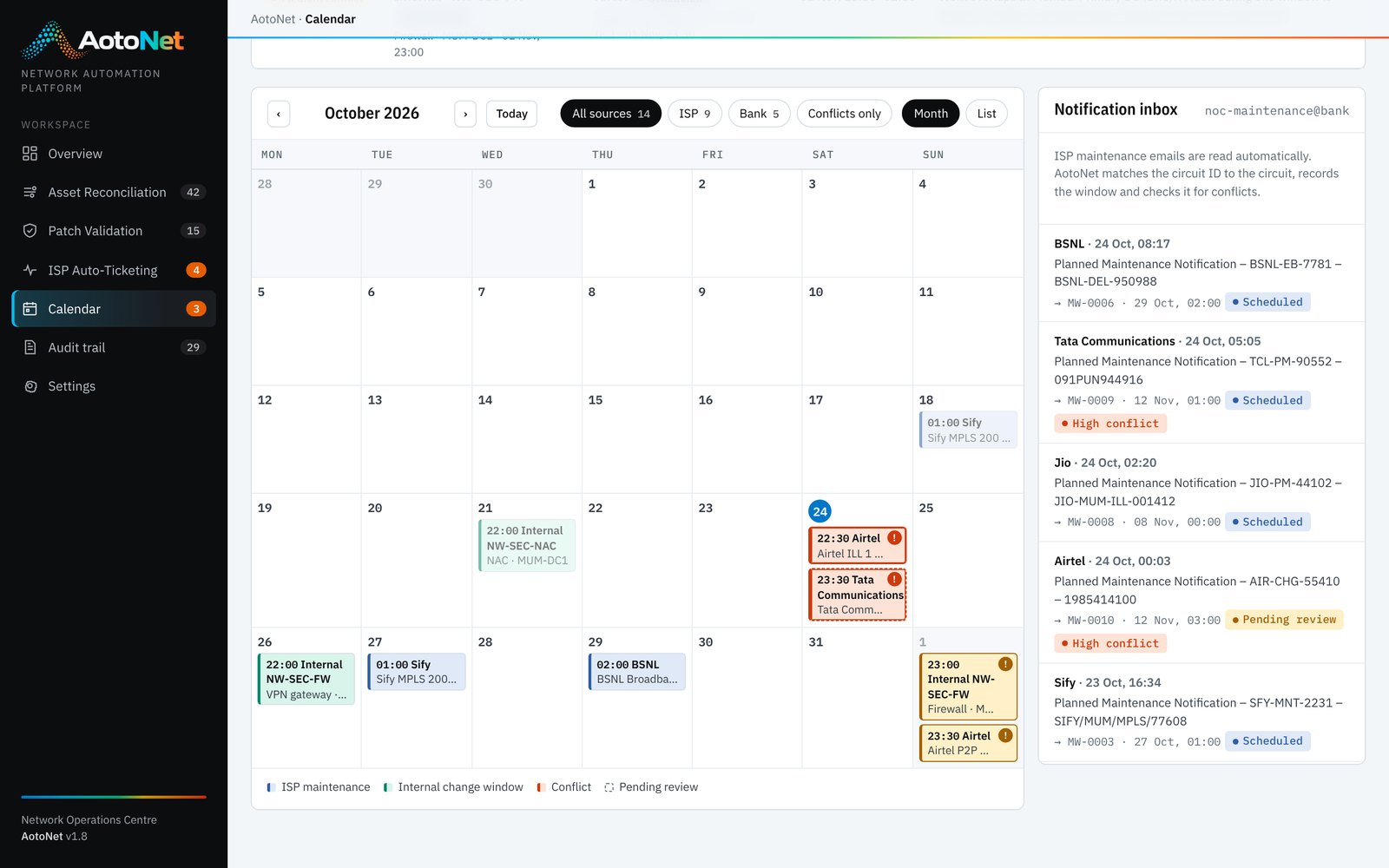
Carrier notices and internal change windows on one calendar, with clashes flagged.
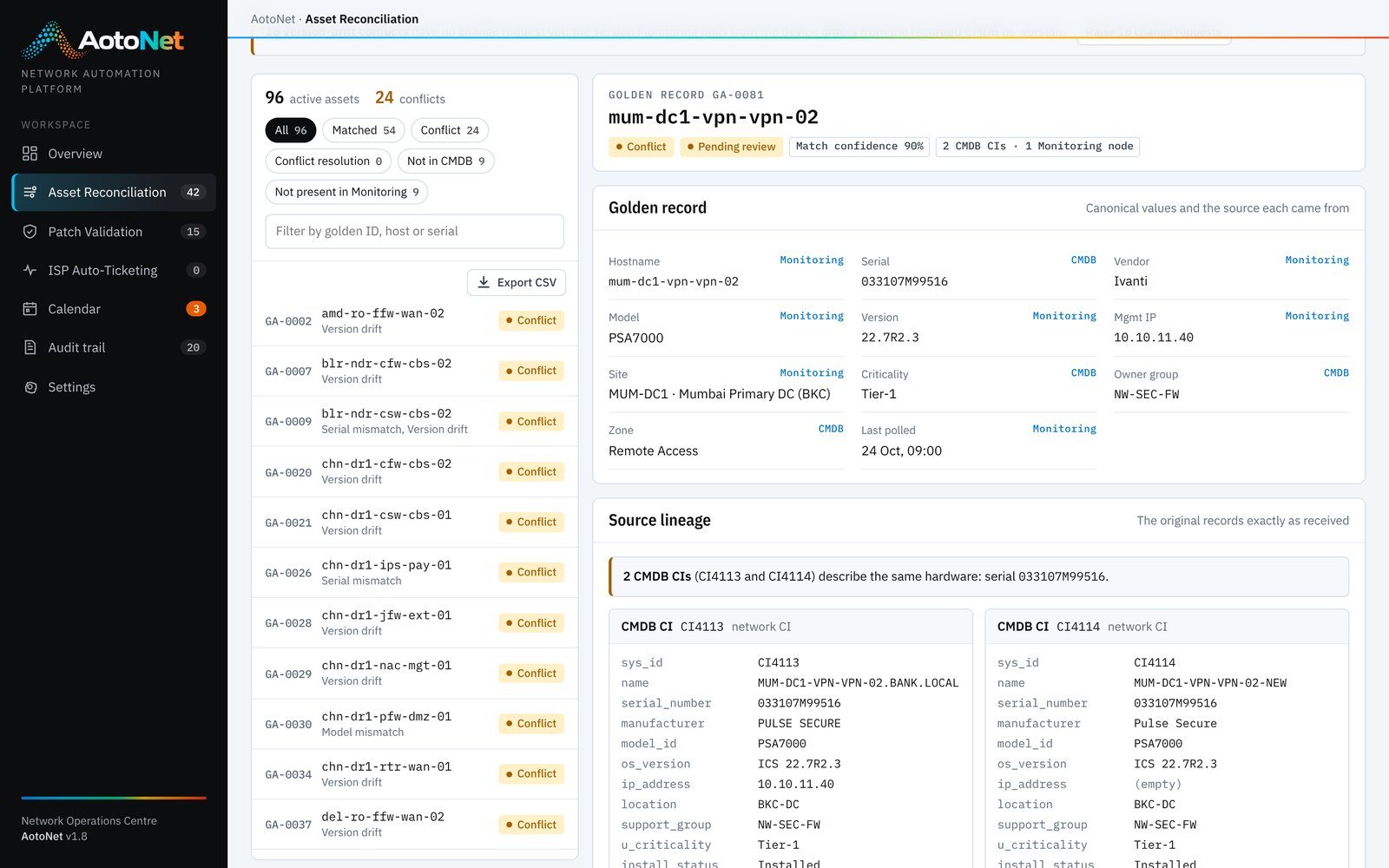
Explore →Asset Reconciliation
One inventory your whole team can trust.
AotoNet runs the same job continuously, with rules instead of spreadsheets.
- Connect the sources
- Normalise identifiers
- Match deterministically
- Classify every device
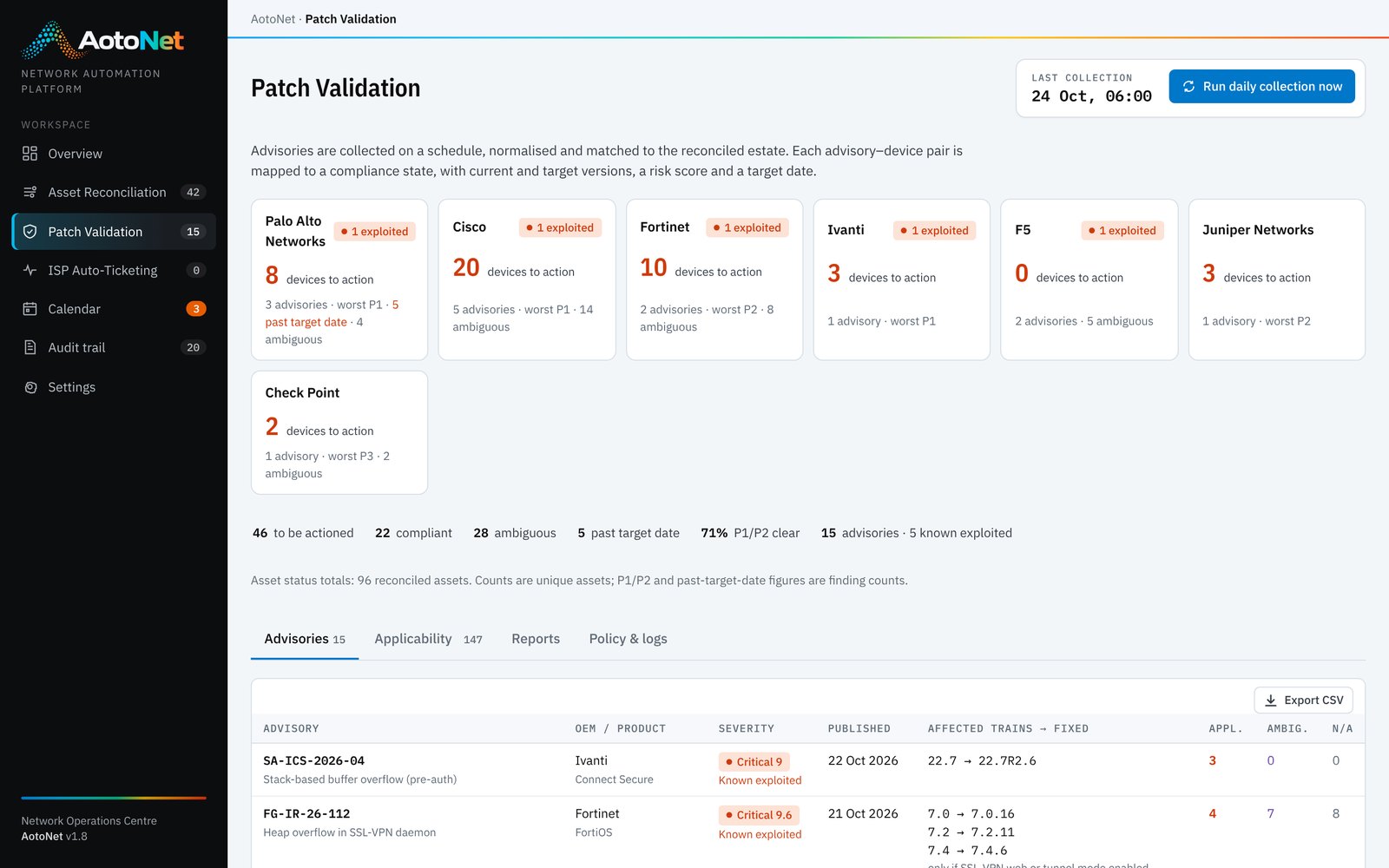
Network Patch Management
Know which advisories matter, by the next morning.
AotoNet turns patching into a daily, evidence-based pipeline.
- Collect advisories daily
- Normalise the advisory
- Match to real devices
- Decide applicability
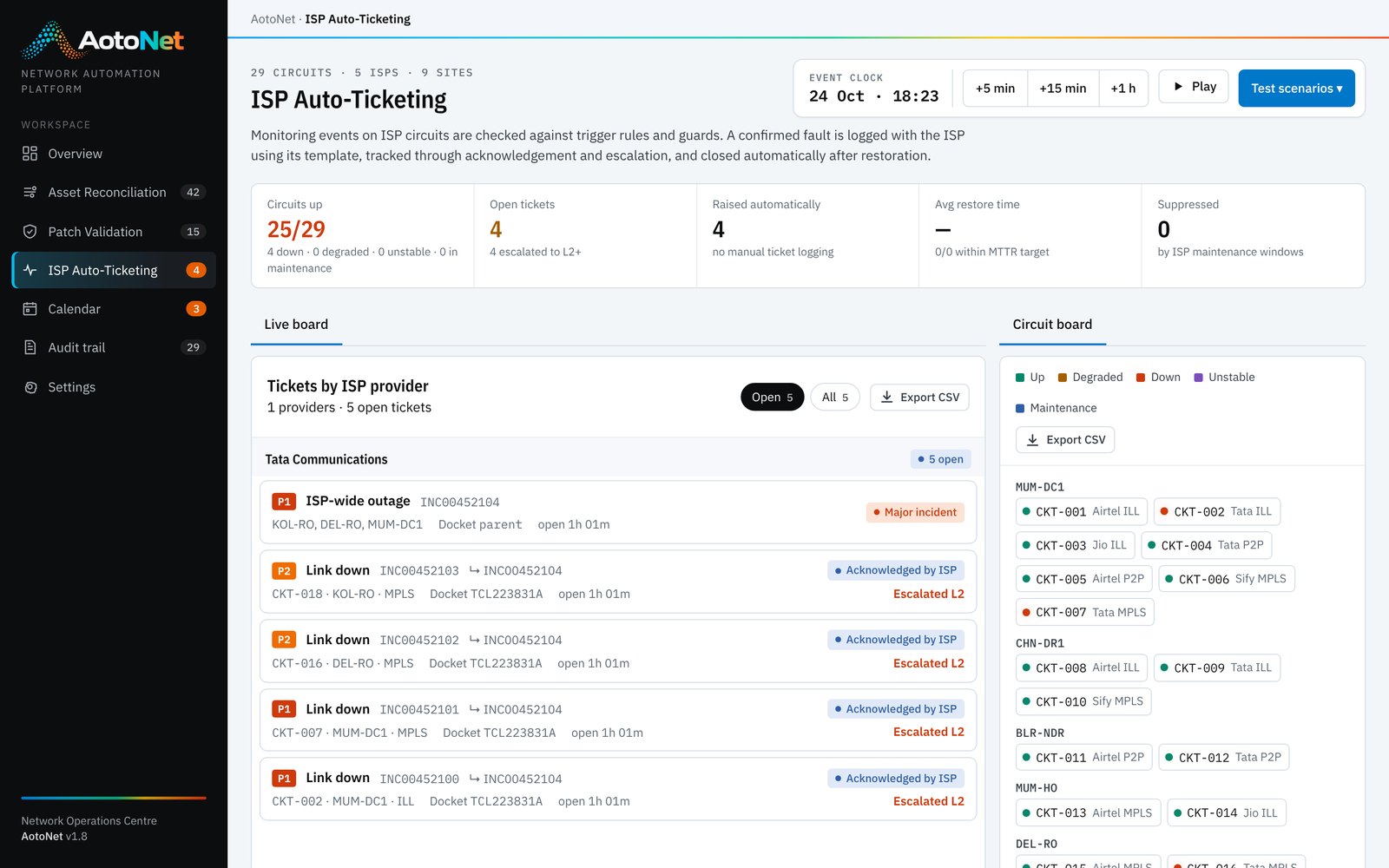
ISP Ticket Management
The ISP hears about the outage before your users do.
AotoNet handles the full lifecycle by rule, with diagnostics and evidence attached.
- Ingest monitoring events
- Apply trigger rules
- Check the guards
- Attach diagnostics
Maintenance Calendar
See the clash before both links go dark.
AotoNet reads the notices, places them and checks them for conflicts automatically.
- Read carrier emails
- Match circuits
- Add internal windows
- Detect conflicts
Beyond the first four
More of the network, automated
The same inventory, rules engine, approvals and audit trail extend to the rest of network operations.
Configuration backup & drift detection
Scheduled configuration backups, comparison against the approved baseline and alerts on unauthorised change.
Configuration compliance
Continuous checks of every device configuration against hardening benchmarks and internal policy, with evidence packs.
Firewall rule hygiene
Finds unused, redundant and risky rules, and runs periodic rule recertification with owners.
Certificate, licence & support expiry
Tracks expiry dates across devices and contracts and raises renewals well ahead of time.
End-of-life & end-of-support tracking
Maps vendor lifecycle bulletins to the reconciled inventory and builds a refresh plan by date and risk.
Pre- and post-change validation
Captures routes, interfaces, sessions and neighbours before and after each change and compares them automatically.
Live demo
Try AotoNet yourself, no sign-up needed.
The demo runs the full product on a sample network of firewalls, routers, switches and carrier circuits. Click through it at your own pace.
- Open a golden record and see how each field was decided
- Check which vendor advisories apply to which devices
- Follow a carrier ticket from detection to automatic closure
- Spot a maintenance clash on the calendar
netops.aotonet.com · sample data, resets on reload
How it works
One pipeline behind every use case.
The same five steps run whether AotoNet is reconciling an inventory, triaging an advisory or logging a carrier fault, so every outcome can be traced back to its inputs.
Connect
Read ITSM and CMDB, monitoring and observability tools, device managers, vendor advisory feeds and carrier mailboxes.
REST · CSAF · RSS · SNMP · syslog · email
Normalise
Clean hostnames, serials, vendors, models, versions, circuits and sites into one canonical model.
PAN-OS 10.2.9-h1 → 10.2.9-h1
Decide
Apply your rules: matching, applicability, risk and SLA, ticket triggers, guards and conflict checks.
Rules you can read and edit
Act
Raise change requests, update records, log carrier tickets, escalate and reschedule, with approval where you want it.
ITSM · carrier channels · email
Prove
Every run, decision and approval lands in an audit trail, ready for internal audit and regulators.
Who · what · when · why
Built for regulated operations
Automation your auditors and your CISO will sign off.
AotoNet is designed for environments where every change needs a reason and every decision needs an owner, such as banking, financial services and other regulated industries.
Explainable decisions
Matching, applicability and ticketing follow rules you can read. Nothing is decided by a black box.
Rule · inputs · resultHuman in the loop
Corrections, exceptions and escalations go through approval. Automation proposes; your team decides where it matters.
Propose → review → approveComplete audit trail
Every automated run and every user action is recorded with actor, time and detail.
History for every recordEvidence before closure
A patch finding closes only when the new version is confirmed. A carrier ticket closes only after the link holds stable.
Verify, then closeFits your tools
AotoNet works alongside your ITSM, CMDB and monitoring platforms rather than replacing them.
Your systems stay the source of recordRole-based workflows
Approval steps and visibility follow your own operating model, from the operations team to the business owner.
Configured to your processGet started
See AotoNet on your own network.
Book a 30-minute walkthrough of the four modules, then talk to us about a pilot on a sample of your own data.